- English
- Español
- Português
- русский
- Français
- 日本語
- Deutsch
- tiếng Việt
- Italiano
- Nederlands
- ภาษาไทย
- Polski
- 한국어
- Svenska
- magyar
- Malay
- বাংলা ভাষার
- Dansk
- Suomi
- हिन्दी
- Pilipino
- Türkçe
- Gaeilge
- العربية
- Indonesia
- Norsk
- تمل
- český
- ελληνικά
- український
- Javanese
- فارسی
- தமிழ்
- తెలుగు
- नेपाली
- Burmese
- български
- ລາວ
- Latine
- Қазақша
- Euskal
- Azərbaycan
- Slovenský jazyk
- Македонски
- Lietuvos
- Eesti Keel
- Română
- Slovenski
- मराठी
- Srpski језик

Why Is LCD Monitor Flip-Flop the Smarter Choice for Modern Conference Tables?
Article Summary
In many meeting rooms, the real problem is not the screen itself but the way it takes over the table, interrupts eye contact, and makes the space look crowded even when the system is not in use. A well-designed LCD Monitor Flip-Flop helps solve these issues by hiding the display inside the table, keeping the desktop clean, improving viewing comfort, and supporting a more organized meeting workflow.
In this article, I will explain where this type of solution adds value, what buyers should pay attention to before purchasing, how it addresses privacy, space, cable management, and user experience concerns, and why working with Guangzhou Junnan Audiovisual Technology Co,.Ltd. can make the selection process more practical for commercial and institutional projects.
Table of Contents
- Outline
- What Problems Does an LCD Monitor Flip-Flop Solve?
- Where Does an LCD Monitor Flip-Flop Work Best?
- Which Features Matter Before You Buy?
- How Does It Compare With Traditional Monitor Setups?
- What Should Buyers Check Before Choosing a Supplier?
- How Can You Choose the Right Configuration?
- FAQ
- Conclusion
Outline
- Common meeting room frustrations caused by exposed monitors
- How hidden flip-up display systems improve order and usability
- Key scenarios where these systems create real operational value
- Important specifications that affect long-term performance
- Differences between ordinary desktop screens and integrated flip systems
- Practical buying advice for project owners, integrators, and procurement teams
- Frequently asked questions before inquiry and ordering
What Problems Does an LCD Monitor Flip-Flop Solve?
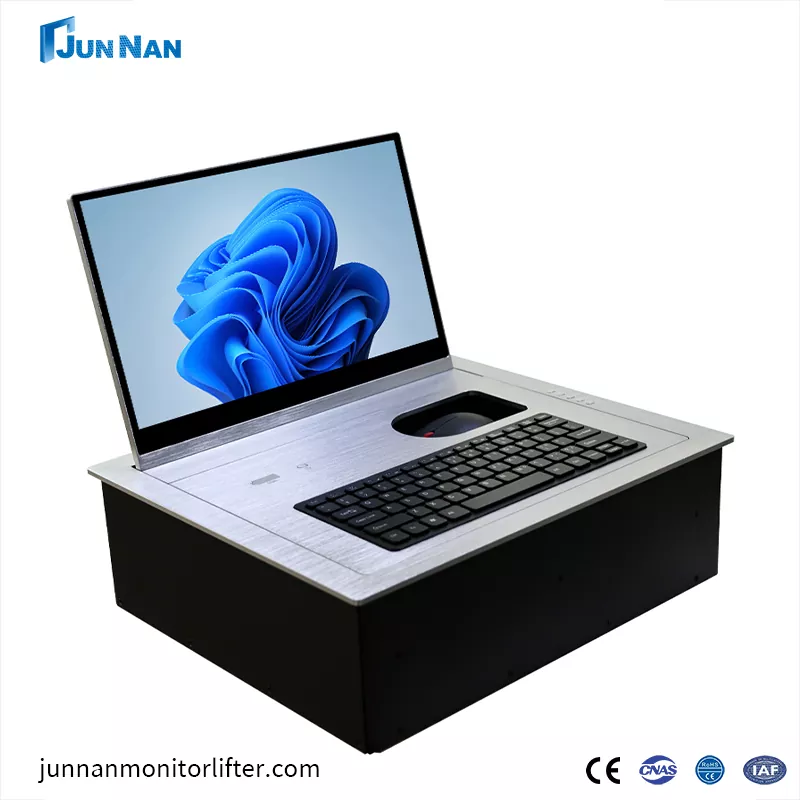
I often find that buyers do not start by asking about motors, housing depth, or screen size. They start with a more frustrating question: why does the meeting room still feel messy and inefficient after spending so much on furniture and audiovisual equipment? That is exactly where the LCD Monitor Flip-Flop becomes relevant.
A fixed desktop monitor stays visible all the time. That means it occupies table space, blocks face-to-face communication, creates visual clutter, and makes the room feel less premium. In executive boardrooms, training centers, government conference spaces, and smart meeting environments, that is a serious problem. People want technology to be available when needed and invisible when not needed.
A flip-style embedded display solves this by keeping the monitor hidden inside the conference table. When the meeting begins, the screen opens smoothly for viewing. When the session ends, it folds away and restores a clean surface. That change may sound simple, but from a user’s perspective it improves the room in several ways:
- It keeps the tabletop neat and professional.
- It reduces visual obstruction between participants.
- It helps protect on-screen information when the display is not in use.
- It supports more flexible use of the same room for different meeting formats.
- It makes cleaning and daily room management easier.
For buyers trying to create a high-end environment without wasting space, this is not a decorative upgrade. It is a practical answer to a daily problem.
Where Does an LCD Monitor Flip-Flop Work Best?
Not every project has the same priorities, so it helps to look at the use cases. I usually see the LCD Monitor Flip-Flop perform best in places where appearance, order, and controlled technology use all matter at the same time.
| Application Scenario | Main Need | How a Flip-Flop Display Helps |
|---|---|---|
| Executive boardrooms | Premium appearance and smooth presentations | Hides equipment when idle and keeps the table elegant |
| Government and institutional meeting rooms | Orderly layout and controlled information display | Supports a cleaner visual environment and better space discipline |
| Training rooms | Flexible room usage | Allows screens to appear only when training content is needed |
| Paperless conference systems | Integrated digital workflow | Combines display convenience with concealed installation |
| High-end commercial projects | Project image and user comfort | Creates a more polished and technologically coordinated setup |
What matters here is not only the movement of the monitor, but the way the room behaves before, during, and after use. A good system supports the environment rather than competing with it.
Which Features Matter Before You Buy?
This is where many buyers make avoidable mistakes. They compare products by appearance alone, or choose only by screen size and price. That usually leads to installation trouble or disappointing daily performance. I would rather evaluate the system by what the end user actually experiences.
Here are the features I believe deserve the most attention:
-
Smooth one-touch operation
A meeting room device should not feel fussy. Quick opening and closing makes the room easier to use for everyone, not just technical staff. -
Adjustable viewing angle
Forward and backward adjustment matters because people do not all sit at the same distance or height. A fixed angle can make a display technically functional but practically uncomfortable. -
Optional touch capability
In collaborative or interactive environments, touch support can make the screen more useful than a passive display. -
Optional microphone integration
For conference projects, combining display and discussion functions into a cleaner tabletop layout can reduce clutter and simplify planning. -
Anti-pinch protection
Safety should never be treated as an extra. In shared spaces, reliable protective functions reduce risk during movement. -
Embedded hidden installation
The whole point of the system is to disappear neatly into the table when not in use. The installation result should look intentional, not improvised.
This is also why supplier communication matters. A product may look fine in a listing, but if the supplier cannot clearly discuss table cutout dimensions, usage frequency, control options, and matching project scenarios, the buying process becomes more risky than it needs to be.
How Does It Compare With Traditional Monitor Setups?
Some buyers still ask whether they really need a specialized flip system when an ordinary monitor seems cheaper. I understand the instinct, but the comparison becomes clearer once we look at daily use instead of initial hardware cost alone.
| Point of Comparison | Traditional Desktop Monitor | LCD Monitor Flip-Flop |
|---|---|---|
| Table appearance | Always visible and space-consuming | Hidden when not in use |
| User interaction | Static position | Motorized opening with adjustable angle |
| Meeting room flexibility | Limited because equipment remains exposed | Better for multipurpose rooms |
| Perceived project level | Functional but ordinary | More integrated and refined |
| Privacy when not in use | Screen remains present | Display folds away into the table |
| Cable and device management | Can appear cluttered | Usually easier to organize in a designed system |
So yes, the flip system is a more specialized solution. But in the right environment, it solves a set of problems that ordinary monitors were never designed to solve.
What Should Buyers Check Before Choosing a Supplier?
I think this part is just as important as the product itself. Even a good LCD Monitor Flip-Flop can become a poor purchase if the supplier does not match the needs of the project.
Before sending an inquiry, I would check these points:
-
Project understanding
Does the supplier ask about your table design, room function, and desired operation method, or do they only push a standard model? -
Customization capability
Conference projects are rarely identical. Size, finish, control method, and integration details often need adjustment. -
Installation clarity
Are dimensions, mounting needs, and usage requirements explained clearly enough to help your project team avoid mistakes? -
Communication speed
Delayed or vague replies during inquiry often become bigger problems during ordering and after-sales support. -
Product consistency
For larger projects, consistency matters. The final installed effect should look uniform across the room, not pieced together.
This is where Guangzhou Junnan Audiovisual Technology Co,.Ltd. becomes worth noting. For buyers in the audiovisual, conference furniture, and integrated meeting system space, working with a manufacturer focused on concealed meeting room equipment is often more practical than sourcing from a general display vendor that does not fully understand embedded conference applications.
How Can You Choose the Right Configuration?
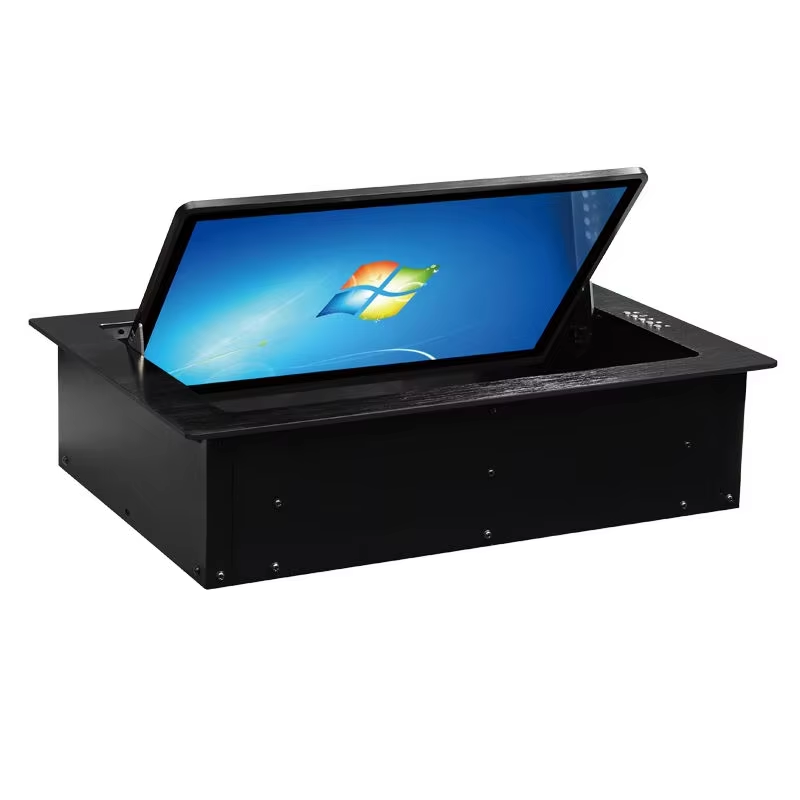
I would not choose purely by what looks impressive in a photo. I would choose according to the actual behavior of the room. A few simple questions can help narrow the configuration much faster:
- Will users need touch interaction or only display viewing?
- Should the system be paired with a microphone for a cleaner tabletop layout?
- How frequently will the monitor open and close each day?
- What screen size best fits the table dimensions and seating distance?
- Is the project more focused on executive appearance, collaborative function, or both?
- Does the client require a particular finish or installation detail to match furniture design?
When these questions are answered early, the selection process becomes more efficient and the final solution feels intentional rather than patched together.
In my view, the best LCD Monitor Flip-Flop is not simply the one with the most features. It is the one that fits the room, the workflow, and the people who will use it every day.
FAQ
1. Is an LCD Monitor Flip-Flop suitable only for luxury boardrooms?
No. It is especially attractive in premium environments, but it is also useful in training rooms, institutional spaces, and paperless conference projects where clean table design and flexible technology use matter.
2. Can this system help protect privacy during meetings?
Yes. Because the screen can be hidden inside the table when not in use, it reduces unnecessary exposure and supports a tidier, more controlled meeting environment.
3. Why is angle adjustment important?
Different seats create different viewing positions. A monitor that adjusts forward and backward can improve comfort and readability for more users.
4. Should I choose a model with touch capability?
That depends on the room’s purpose. If participants need to interact directly with content, touch support adds value. If the monitor is mainly for viewing information, a non-touch option may be enough.
5. Can the monitor system be combined with a microphone?
Yes. In many conference applications, pairing the display with a microphone helps create a more integrated and less cluttered tabletop arrangement.
6. What should I prepare before contacting a supplier?
It helps to prepare your preferred screen size, table dimensions, project quantity, room application, and any specific control or appearance requirements. That makes recommendations much more accurate.
Why Does the Right Supplier Make All the Difference?
A meeting room should not feel crowded by its own technology. It should feel efficient, calm, and ready. That is exactly why a well-chosen LCD Monitor Flip-Flop matters. It brings order to the table, improves user comfort, and supports a cleaner, more professional conference environment without sacrificing functionality.
If you are planning a new conference room, upgrading a paperless meeting system, or sourcing concealed display solutions for a commercial project, Guangzhou Junnan Audiovisual Technology Co,.Ltd. is ready to help you turn technical requirements into a cleaner and more impressive final result.
Looking for a smarter conference table display solution that feels polished in daily use and convincing in front of clients? Contact us to discuss your project, request product details, and find the right LCD Monitor Flip-Flop configuration for your meeting space.